


Rain Gauge & Dark Sky Tech
3.91.87K Reviews
App Specs
- Version
- Varies with Device
- Updated On
- License
- Free
- Downloads
- 100,000+
- Developer
- Hyperlocal Weather App
- Categories
- Weather
- Platform
- Android
Screenshots
 Analysis by AppCompare
My first test with Dark Sky Tech & Radar Forecast starts with a familiar problem: I need to leave soon, the sky looks unsettled, and a broad daily forecast isn’t enough to decide whether to walk, drive, or bring a raincoat. This is a weather app built around local forecasts and radar, so its appeal is the chance to check conditions for a specific place rather than rely on a vague glance outside. I find that focus useful when the timing matters, though it still takes judgment to turn a forecast into a practical plan.
Start with the place and the decision
Before I open any weather app, I try to be clear about what I’m deciding. Do I only need to know whether to carry an umbrella, or am I choosing when to set out? With this app, that distinction matters: a radar view can help me understand what is approaching, while the forecast gives me a broader picture of the day. I’d use both together instead of treating one screen as a definitive answer.
That makes it a natural fit for everyday plans such as walking to a station, taking a dog out, or deciding whether to move an outdoor errand earlier. For a trip across town, I’d check the forecast for the destination as well as the place I’m leaving. Local conditions can differ, and a useful weather routine starts by asking about the right place—not just opening the app and assuming the first location answers every question.
What Makes Dark Sky Stand Out?
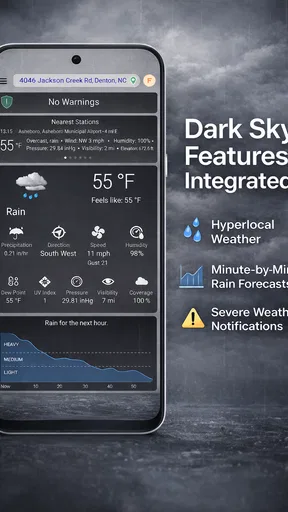
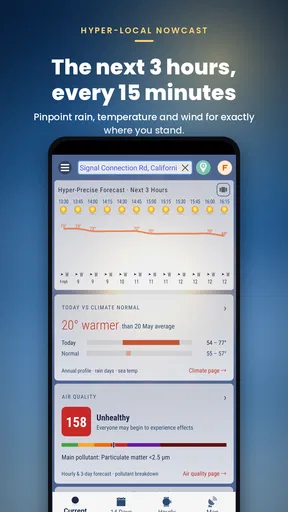
First off, Dark Sky Tech & Radar Forecast gives you an incredibly detailed look at the weather. We're not just talking about a generic "partly cloudy" forecast. This app dives deep, offering hyper-localized weather predictions. It's like having a meteorologist in your pocket, ready to give you the lowdown on when that rain will start, to the minute!
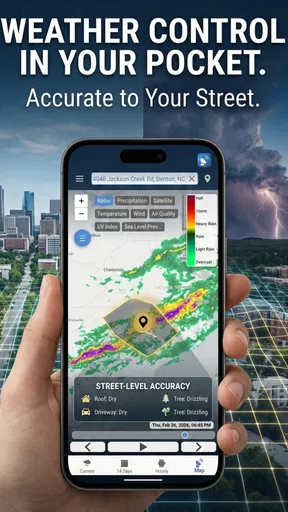
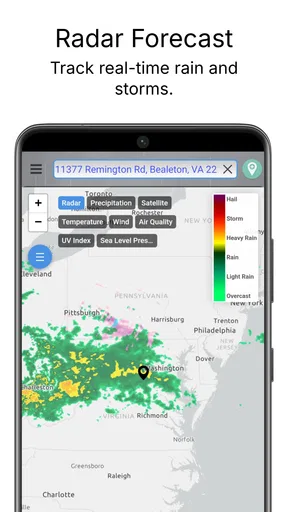
One of my favorite features is the radar map. It's not just a static image; it's interactive. You can zoom in and out, scroll through different areas, and really get a sense of what's happening in the sky above. Trust me, it's way more fun than staring at those old-school weather maps on TV.
Turning a forecast into a workable plan
My practical sequence is simple: check the summary first, inspect the radar if rain is relevant, then decide whether the plan needs to change. I wouldn’t spend time studying the map when I only need a quick temperature check. But if I’m choosing between leaving now and waiting, the map is the more useful part because it lets me look at the weather pattern around my area rather than treating a single icon as the whole story.
For example, imagine I’m about to walk to a nearby shop and the forecast suggests unsettled weather. I can look at the radar, judge whether the conditions seem worth planning around, and take a jacket or choose another time. On a longer drive, I’d use the app as a prompt to check conditions along the way, not as a substitute for safe driving or for paying attention to changing weather. I’d make those checks before setting off rather than trying to interpret a map on the move.
Worth Reading Before You Choose

EA SPORTS FC Mobile 26 Is a Bigger Football Game, but It Takes Time

Flipboard Shows What News Apps Must Do Beyond the Feed

Switching to Android Auto Means Rethinking Your Driving Routine

Google Calendar Makes a Crowded Week Easier to Manage

Ludo King Makes the Most of the Minutes Between Plans

Baby Panda World Brings Quick Play to Modern Phones, but Its Game Library Feels Busy
The app’s developer is Hyperlocal Weather App, and its store summary points to Apple’s WeatherKit as the technology behind its weather approach. That helps explain the product’s emphasis, but I wouldn’t read a technology reference as a guarantee that every local forecast will be exact. Weather changes, and local conditions can be tricky; I treat minute-level timing as guidance to help me plan, not a promise that rain will begin at a precise moment.
User Interface and Experience
Now, let's talk about the user interface. Dark Sky is sleek and intuitive. Even if you're not tech-savvy, navigating through the app is a breeze. Everything is laid out in a way that just makes sense. The color scheme is easy on the eyes, and the information is presented clearly. You won't find yourself squinting at your screen or struggling to find what you're looking for.
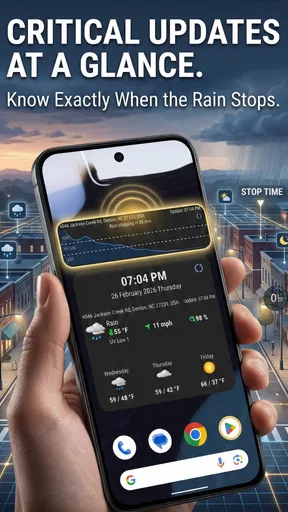
It also has customizable notifications. Want to know when it's going to rain so you can grab your umbrella? You got it. Need a heads-up about potential snowstorms? No problem. You can tailor the alerts to fit your specific needs, making it a personalized weather assistant.
Set alerts around the moments that matter
In my experience, notifications are most useful when they answer a specific question. I’d rather receive a rain alert that helps me decide whether to take a walk now than a stream of weather prompts that I stop noticing. I’d begin with the alert types I care about, then adjust them after seeing how they fit my routine. If I’m often indoors during the day, an alert may matter more shortly before a commute or an outdoor appointment than at an arbitrary time.
There is a trade-off here: alerts can save a few checks, but too many can become noise. I’d keep only the ones that change what I do, and rely on the app itself for curiosity-driven checks. If notifications are not arriving at a useful moment, that does not necessarily mean the forecast is wrong; it may mean my chosen alert setup doesn’t match my schedule. A little restraint makes this kind of feature more helpful.
Radar also works best as a handoff between information and action. I check it, make a decision, then put the phone away. If the map leaves me uncertain, I would not keep zooming in until I convince myself it says what I want. I’d choose a low-cost precaution—carry a compact umbrella, for instance—or use a more conservative plan. The app can help me notice a risk; it cannot remove uncertainty from the sky.
Where it fits among weather apps
Compared with a basic weather app that mainly gives a daily high, a short summary, and perhaps a simple icon, this one is more appealing when local detail and radar are part of the decision. A general-purpose forecast may be quicker for a glance at tomorrow’s temperature, while this app gives me a reason to look more closely at nearby conditions and timing. I would not switch solely for a decorative map; the value is whether that map changes a real choice I make.
It also occupies a different niche from a specialist tool used to monitor severe conditions. For ordinary planning—commuting, errands, or deciding when to go outside—the app’s mix of forecast, radar, summaries, and alerts can be convenient. If someone needs authoritative emergency instructions or has a job that depends on detailed meteorological analysis, I’d pair a consumer forecast with the appropriate official sources rather than ask one phone app to do every job.
Additional Features Worth Mentioning
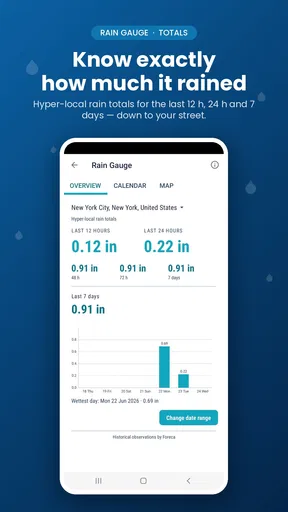
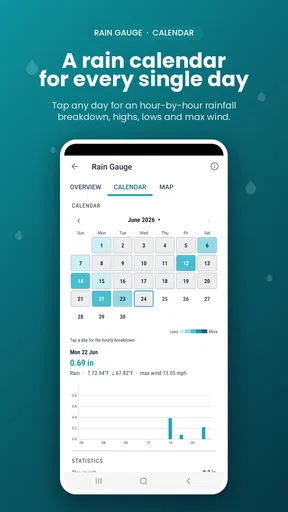
Besides the basics, the app offers a few more goodies. There's an option to explore historical weather data, which is great for those of us who are curious about past weather patterns. And the daily summary feature gives you a neat overview of what to expect, so you’re always prepared.
Also, if you're a bit of a weather geek like me, you'll appreciate the solar and lunar data sections. Knowing sunrise and sunset times, moon phases, and more can be surprisingly useful.
Small routines that make the extra information useful
I’d use the daily summary as a morning planning checkpoint rather than as something to keep reopening all day. It can help me spot the broad shape of the day before I choose clothes or decide when to run an errand. Then, if the weather becomes the deciding factor, I can move to the radar or a relevant alert. That two-stage habit keeps the overview from becoming clutter and gives the more detailed tools a clear purpose.
Historical weather is better for looking back and noticing patterns than for deciding what will happen next. I might use it to satisfy a question about how a particular stretch of weather felt, but I wouldn’t confuse past conditions with a forecast. Sunrise and sunset information has a more immediate use: when planning a walk or an outdoor task, I can consider daylight as well as rain. The moon details are enjoyable for curiosity, but they won’t matter to every user, and I wouldn’t choose the app on that feature alone.
Cost, audience, and practical limits
The app is free to download and is rated for Everyone. It has an average rating of 4.2 from around 7,700 ratings, with roughly 1,800 written reviews and over 100,000 installs. Those figures suggest that people are using it, but they don’t tell me whether its forecasts will suit my neighborhood or habits. I’d judge it by whether the local view and alert options help with the decisions I actually make.
There are in-app purchases, with items listed from $9.49 to $23.99. I’d explore the free experience before paying for anything and check what an item includes at the point of purchase. If I only need a quick daily forecast, a simpler alternative may be enough and there may be little reason to spend. If radar and more tailored weather checks become part of my regular routine, then I can decide whether the available purchase is worth its cost to me.
The current version is called Altocumulus, and the app requires Android 8.0 or later. That matters if you’re installing it on an older device: I’d check compatibility before building it into a daily routine. The developer is Hyperlocal Weather App, and the app’s focus on WeatherKit-powered local forecasting is a specific reason to try it, not a reason to assume it will outperform every other weather service in every location.
Who should keep it—and who can skip it
I’d recommend trying it if you often make plans around the timing of rain, like looking at a map instead of relying only on a daily icon, or want alerts that fit an outdoor routine. It could be especially handy for someone who walks or cycles locally and checks the weather before leaving. People who mainly want a quick temperature glance may be happier with whatever uncomplicated weather app they already use.
I’d also skip relying on it as the only source for high-stakes decisions. A consumer forecast is useful for everyday planning, but severe weather calls for attention to official warnings and local guidance. Likewise, anyone who dislikes notifications should keep them limited or leave them off; the app’s value does not depend on being interrupted. The best setup is the one that gives useful context without turning weather-checking into a constant task.
The Verdict
So, is Dark Sky Tech & Radar Forecast worth the download? Absolutely. It's packed with features, user-friendly, and provides accurate, timely information. Whether you're planning your day or just curious about the weather, this app has got you covered.
Sure, there are plenty of weather apps out there, but Dark Sky carves out its niche with its precision and ease of use. It’s like having a weather station right in your pocket, ready to give you the forecast you need when you need it. So, go ahead and give it a try. You might find yourself checking the weather just for fun!
My more measured recommendation is to try it for the kinds of decisions where its local forecast and radar can make a difference, then keep only the parts that earn a place in your routine. I like the combination of a quick overview and a map I can inspect when the timing matters, while the alerts and extra sky information offer useful options rather than essentials for everyone. Its main limitation is the one shared by any forecast: it supports a decision, but it cannot guarantee the weather will follow the prediction. If you want a more detailed way to plan an ordinary day around changing conditions, it is worth a look; if a basic forecast already answers your needs, you can comfortably stick with that.
Pros
- Accurate weather predictions.
- Intuitive and clean interface.
- Customizable alerts for severe weather.
- Detailed radar maps available.
- Low battery consumption.
Cons
- Limited free features.
- Occasional data refresh delays.
- Requires internet for full functionality.
- High subscription cost for premium.
- No widget support on iOS.
FAQs for Rain Gauge & Dark Sky Tech
What features does Dark Sky Tech & Radar Forecast offer?
Dark Sky Tech & Radar Forecast provides hyper-local weather information, including minute-by-minute precipitation forecasts, radar maps, and severe weather alerts. It also offers detailed weather data like temperature, humidity, and wind speed, ensuring users stay informed about current and upcoming weather conditions in their area.
Is Dark Sky Tech & Radar Forecast available for both Android and iOS devices?
Yes, Dark Sky Tech & Radar Forecast is available for both Android and iOS platforms. Users can easily download the app from the Google Play Store for Android devices or the Apple App Store for iOS devices, making it accessible to a wide range of users.
Does Dark Sky Tech & Radar Forecast require a subscription?
Dark Sky Tech & Radar Forecast operates on a freemium model. Basic features are available for free, but there are premium features that require a subscription. The subscription offers advanced functionalities like extended forecasts and ad-free usage, enhancing the overall user experience.
How accurate is the weather data in Dark Sky Tech & Radar Forecast?
The app is renowned for its accuracy, especially its minute-by-minute precipitation forecasts. It uses advanced meteorological data and algorithms to provide precise weather predictions. However, like any weather app, the accuracy can vary based on location and unforeseen weather changes.
Can I customize notifications in Dark Sky Tech & Radar Forecast?
Yes, users can customize notifications to receive weather alerts tailored to their preferences. You can set up alerts for specific weather conditions, such as rain, snow, or severe weather warnings, ensuring you are always prepared for any changes in your local weather.


